Caregiver Reminders
Recordatorios para cuidadores · English first, español abajo
Tutti, operated by Majestical Roof LLC, can send care-task reminders by WhatsApp or text message (SMS) to caregivers. You only receive them if you choose to. Here is exactly how that works.
How to opt in
Once you are signed in to Tutti, the reminders screen shows the exact message, the number it goes to, and the terms, before you send anything. Opting in takes one message from you:
- In Tutti, go to Profile and open WhatsApp reminders. The screen shows the number, +1 617 658 7038, and the message that will be sent, including a one-time code, for example: "Hi, I want to get Tutti reminders. Code: K7QF-92" (or in Spanish, "Hola, quiero recibir recordatorios de Tutti. Código: K7QF-92").
- Read the consent text on the same screen, then tap Open WhatsApp. WhatsApp opens with that message already typed. Send it.
- The code links your WhatsApp number to your Tutti account, and Tutti replies to confirm you're signed up and tells you how to stop. The code works once and expires after 30 minutes.
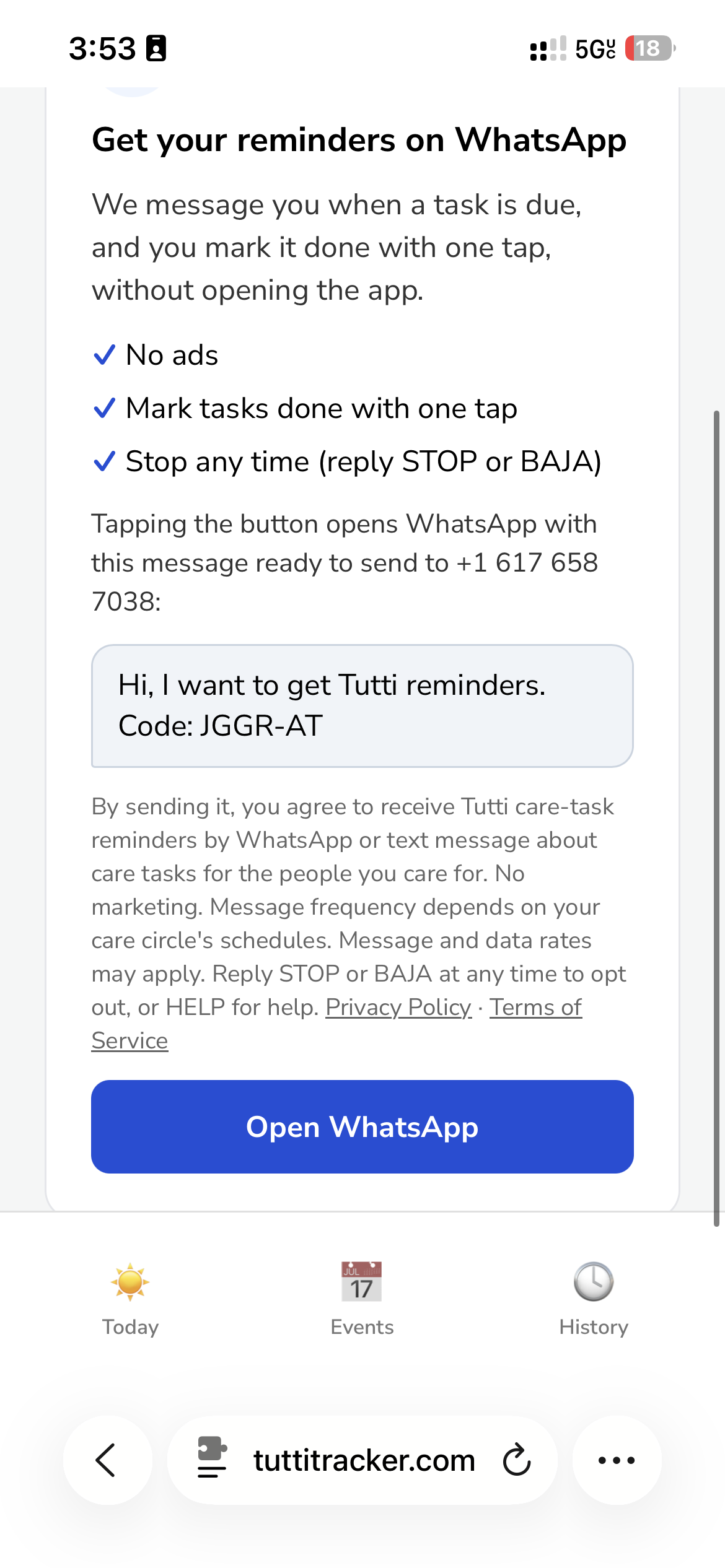
Nobody else can sign you up: only you can send that message, from your own phone, with the code from your own account. We never message a number that hasn't sent us that first message.
Example messages
- Tutti: Reminder, the 8:00 AM morning routine is due. Tap ✅ when it's done. Reply STOP to opt out.
- Tutti: Gracias, quedó registrado. Responde STOP para dejar de recibir recordatorios.
How to opt out
Reply STOP (or BAJA) to any message, or turn off reminders in the Tutti app. You will get one confirmation and no further messages. Reply HELP or email contact@majesticalroof.tech for help.
Your information
No mobile information, including phone numbers and text-messaging opt-in data and consent, will be shared with third parties or affiliates for marketing or promotional purposes.
Recordatorios para cuidadores
Tutti, operada por Majestical Roof LLC, puede enviar recordatorios de tareas de cuidado por WhatsApp o mensaje de texto (SMS) a las personas cuidadoras. Solo los recibes si tú decides recibirlos.
Cómo activar los recordatorios
- En Tutti, entra a Perfil y abre Recordatorios por WhatsApp. La pantalla muestra el número, +1 617 658 7038, y el mensaje que se enviará, con un código de un solo uso, por ejemplo: "Hola, quiero recibir recordatorios de Tutti. Código: K7QF-92".
- Lee el consentimiento que aparece en la misma pantalla y toca Abrir WhatsApp. Se abre WhatsApp con ese mensaje ya escrito. Envíalo.
- El código vincula tu número de WhatsApp con tu cuenta de Tutti, y Tutti te responde para confirmar tu registro y explicarte cómo cancelar. El código funciona una vez y vence a los 30 minutos.
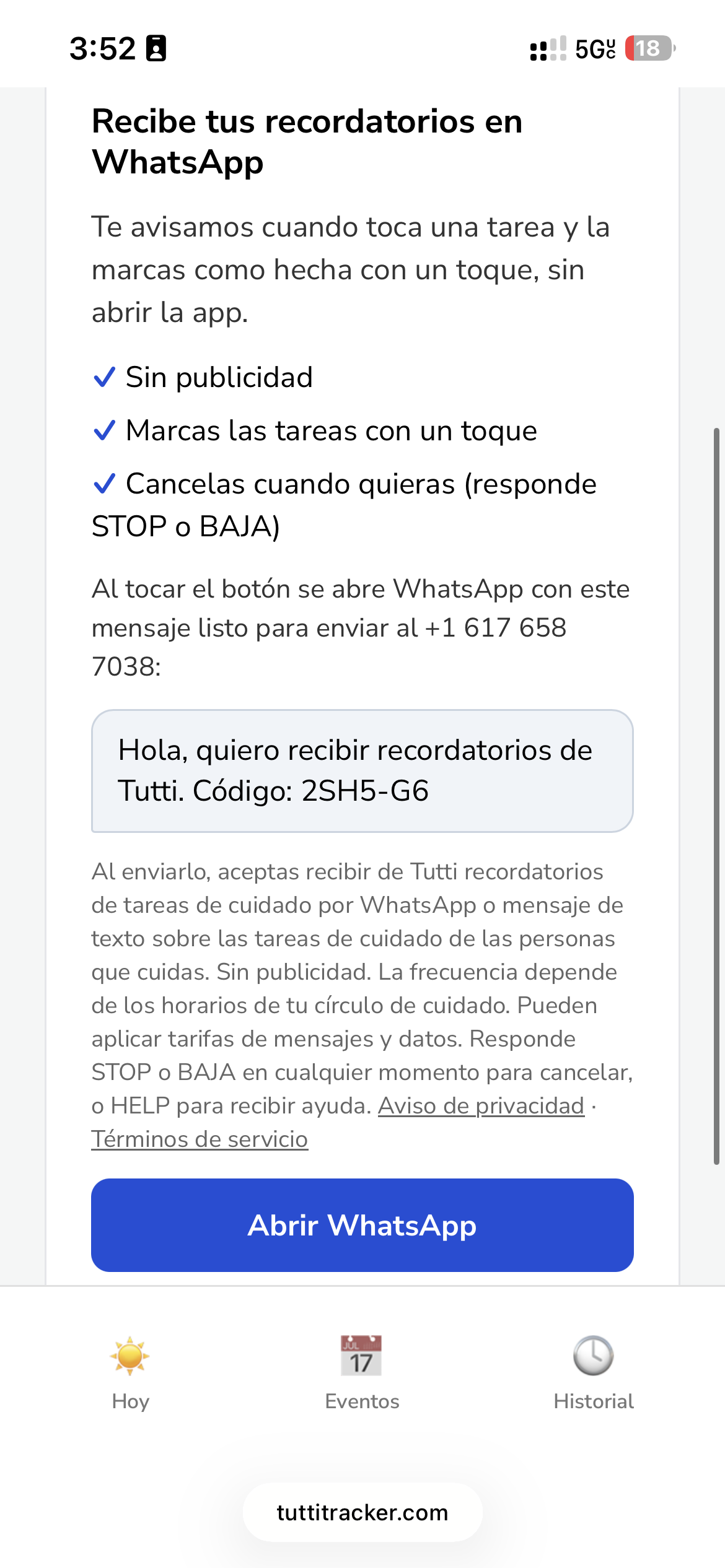
Nadie más puede suscribirte: solo tú puedes enviar ese mensaje, desde tu propio teléfono y con el código de tu propia cuenta. Nunca enviamos mensajes a un número que no nos haya escrito primero.
Cómo cancelar
Responde STOP o BAJA a cualquier mensaje, o desactiva los recordatorios en la app de Tutti. Recibirás una confirmación y ningún mensaje más. Escribe HELP o envía un correo a contact@majesticalroof.tech si necesitas ayuda.